

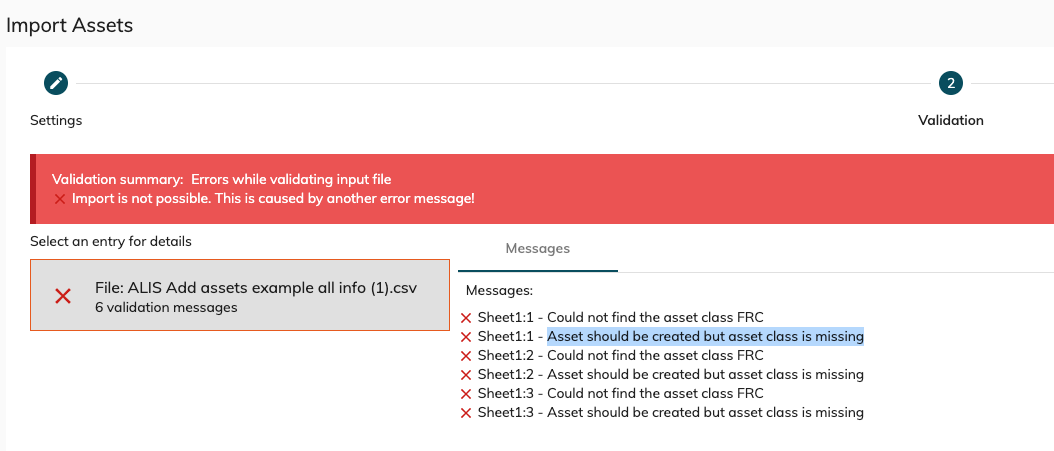
When you try to import one or multiple assets and you encounter the following error in the validation step :
Asset should be created but asset class is missing.
or
Could not find asset class ...
Step-by-step guide
A missing asset class refers to a missing Asset Type. The system is not able to assign certain properties to the asset because it does not know that asset type.
-
Go to Settings → Assets → Asset types
-
Verify the asset class/type desired is present (asset class/type) is the description field of the asset type.
-
Click the "+New Asset Type" button.
-
Fill in the asset class/type missing in the description and fulfil the rest of the form.
-
Select a representation image for that asset class/type ( if there are no images yet in the system - go to Settings > "Asset" > Image Library and upload the desired image.
-
Add the desired preventive maintenance task for that asset type with it's maintenance cycle. ( if the desired maintenance task is not in the list, go to Settings>Maintenance Tasks, and fill in the desired maintenance task , category and validation type > +Add ) ; Revisit and refresh the asset type page
-
hit the "Save" button to add the maintenance type.
-
You can now try to import the asset list again
Related articles